Java SDK
The cloud notification service enables server-side applications to send interactive notifications with support for hierarchical organizational structures, flexible targeting options, and cross-platform delivery. The service communicates with your server-side applications via the TypeScript SDK or the Java SDK.
For an overview, see HERE cloud notification service overview
Initialization
Initialize the CloudNotificationAPI with your service configuration to begin working with notifications.
import com.openfin.*;

// Create API settings
CloudNotificationSettings settings = new CloudNotificationSettings(
    "https://<env>/notifications"
);

// Initialize the API
CloudNotificationAPI notificationApi = new CloudNotificationAPI(settings);
Authentication and connection
Establish a connection to the notification service using either basic authentication or JWT tokens.
Basic authentication
// Configure basic authentication
ConnectParameters.BasicAuthenticationParameters basicAuth =
    new ConnectParameters.BasicAuthenticationParameters(
        USERNAME,
        PASSWORD
    );

ConnectParameters connectParams = new ConnectParameters(
    PLATFORM,
    SOURCE_ID,
    basicAuth
);

// Connect to the service
notificationApi.connect(connectParams);
JWT authentication
The following is an example. See your HERE representative to configure your environment for JWT authentication.
// Configure JWT authentication
ConnectParameters.JwtAuthenticationParameters jwtAuth =
    new ConnectParameters.JwtAuthenticationParameters(
        () -> JWT_TOKEN,  // Token supplier
        AUTHENTICATION_ID
    );

ConnectParameters connectParams = new ConnectParameters(
    PLATFORM,
    SOURCE_ID,
    jwtAuth
);

// Connect to the service
notificationApi.connect(connectParams);
Event listeners
Register listeners to handle incoming notifications, events, and connection status changes.
Notification listener
notificationApi.onNotification(new NotificationListener() {
    @Override
    public void onNotification(Notification notification) {
        System.out.println("Notification received:");
        System.out.println("ID: " + notification.notificationId);
        System.out.println("Correlation ID: " + notification.correlationId);
        System.out.println("Target: " + notification.target);
        System.out.println("Target Type: " + notification.targetType);
        System.out.println("Action: " + notification.action);
        System.out.println("Payload: " + notification.payload);
    }
});
Notification event listener
notificationApi.onNotificationEvent(new NotificationEventListener() {
    @Override
    public void onNotificationEvent(NotificationEvent event) {
        System.out.println("Notification event received:");
        System.out.println("Notification ID: " + event.notificationId);
        System.out.println("Event Type: " + event.type);
        System.out.println("Category: " + event.category);
        System.out.println("User ID: " + event.userId);
        System.out.println("User Name: " + event.userName);
        System.out.println("Payload: " + event.payload);
    }
});
Disconnection listener
// Disconnection listener
notificationApi.onDisconnected(new DisconnectedListener() {
    @Override
    public void onDisconnected() {
        System.out.println("Disconnected from notification service");
    }
});
Publishing a notification
Send a notification to specific users and groups with a customizable payload and delivery options.
Notification payloads in the cloud service are structured in the same way as notification objects in notification center.
Basic notification
The correlation Id is an optional, user-defined ID that correlates a notification with the users' custom data.
// Define notification targets
String[] groups = {GROUP_MEMBER, GROUP_MEMBER};
String[] users = {USER_EMAIL};
NotificationTargets targets = new NotificationTargets(groups, users);

// Create notification options
NotificationOptions options = new NotificationOptions(
    CORRELATION_ID,
    targets
);

// Define the payload
Map<String, Object> payload = new HashMap<>();
payload.put("template", TEMPLATE_TYPE);
payload.put("title", TITLE);
payload.put("body", BODY_TEXT);
payload.put("category", CATEGORY_TYPE);
payload.put("icon", ICON_FILE_PATH);

// Publish the notification
String notificationId = notificationApi.raiseNotification(options, payload);
System.out.println("Notification published with ID: " + notificationId);
Notification with TTL
// Create notification options with 300 second TTL
NotificationOptions options = new NotificationOptions(
    CORRELATION_ID,
    targets,
    300  // TTL in seconds
);

String notificationId = notificationApi.raiseNotification(options, payload);
Updating a notification
Modify the content of an existing notification that has already been published.
// Update notification payload
Map<String, Object> updatedPayload = new HashMap<>();
updatedPayload.put("template", TEMPLATE_TYPE);
updatedPayload.put("title", TITLE);
updatedPayload.put("body", BODY_TEXT);

// Create update options
NotificationUpdateOptions updateOptions = new NotificationUpdateOptions();

// Update the notification
notificationApi.updateNotification(
    notificationId,
    updateOptions,
    updatedPayload
);
Deleting a notification
Remove a notification from the system, triggering delete events for all recipients.
// Delete a notification
notificationApi.deleteNotification(notificationId);
Group hierarchies and targeting
Target notifications using hierarchical group structures for efficient and flexible notification distribution.
The service supports hierarchical group targeting. For example, given this group structure:
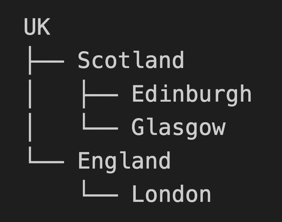
- Targeting London sends to direct London group members only
- Targeting Scotland sends to Scotland, Edinburgh, and Glasgow members
- Targeting UK sends to all members in the hierarchy
In the case of duplication, all members receive only one notification.
// Target specific hierarchy level
String[] groups = {"Scotland"};  // Reaches Scotland, Edinburgh, Glasgow
NotificationTargets targets = new NotificationTargets(groups, null);
Notification events
Post custom events related to existing notifications to provide additional context or user interaction data.
// Create event options with targets
NotificationEventOptions eventOptions = new NotificationEventOptions(targets);

// Post a notification event
notificationApi.postNotificationEvent(
    notificationId,
    FORM_VALUES_CHANGED,
    USER_INTERACTION,
    eventPayload,
    eventOptions
);
Queries and bulk operations
The Cloud Notification Service provides a two-part Java API for managing notifications at scale. The first part allows you to query previously sent notifications based on specific criteria. The second part enables bulk operations on collections of notification IDs returned by the query. This separation allows the query functionality to serve multiple purposes, including populating dashboards or performing bulk management operations.
The query API is currently available in the Java SDK only. If you track notification IDs, you do not need to use the query API to use the bulk operation methods. They are available in both Java and TypeScript SDKs and take in notificationIds as parameters.
Queries
The query API retrieves paginated sets of notifications matching specified criteria. Queries are executed through the getQuery().Execute() method, which accepts query options, a page size, and an optional cursor for pagination.
Query Criteria
The NotificationQueryOptions class supports filtering by notification IDs, application IDs, title patterns (with wildcard support using %), and date ranges specified as timestamps in milliseconds since epoch. The titles filter accepts exact matches or prefix wildcards. For example, "Title1" matches exactly while "Other%" matches any title starting with "Other".
Optional Fields
By default, query results include notification IDs. To include additional fields in the response, configure options.optionalFields with boolean flags for appId, title, date, and payload. Set options.includeInactive to true to include inactive notifications in the results.
appId, title, and date are extracted from payload. Note that payload is the entire notification definition and can be large.
Query Example
NotificationQueryOptions queryOptions = new NotificationQueryOptions();
queryOptions.options.optionalFields.appId = true;
queryOptions.options.optionalFields.title = true;
queryOptions.options.optionalFields.date = true;
queryOptions.titles = Arrays.asList("Title1", "Other%");

NotificationQueryResults results = api.getQuery().Execute(queryOptions, 10, null);
This example retrieves a page of 10 notifications where the title is exactly "Title1" or starts with "Other". The results include appId, title, and date fields. Pass the pageInfo.nextPage cursor from the results to the third parameter to retrieve subsequent pages.
Bulk operations
Bulk operations accept arrays of notification IDs. When executing bulk operations, actions are dispatched to the original targets specified when each notification was created. For example, if a notification was sent to a group and a specific user, the bulk action reaches only those same targets.
deleteNotification
Deletes one or more notifications. Receivers receive an event marking each notification as deleted. Accepts either a single notification ID as a String or an array of notification IDs.
api.deleteNotification(notificationIds);
removeFromNotificationCenter
Removes notifications from the notification center for specified users or groups without deleting the underlying notification data. Requires both the notification IDs and a NotificationTargets object specifying the affected users and groups.
api.removeFromNotificationCenter(notificationIds, targets);
setReminder
Schedules a reminder for one or more notifications. Accepts the notification IDs, target users/groups, a reminder date, and an optional payload object.
api.setReminder(notificationIds, targets, reminderDate, payload);
cancelReminder
Cancels previously scheduled reminders for the specified notifications and targets.
api.cancelReminder(notificationIds, targets);
Combined Query and Bulk Operation
The following example demonstrates querying for notifications matching specific criteria and then removing them from the notification center for all affected users.
// Query for notifications with titles starting with "Alert"
NotificationQueryOptions queryOptions = new NotificationQueryOptions();
queryOptions.titles = Arrays.asList("Alert%");
queryOptions.dateFrom = startTimestamp;
queryOptions.dateTo = endTimestamp;

NotificationQueryResults results = api.getQuery().Execute(queryOptions, 100, null);

// Extract notification IDs from results
String[] ids = results.data.stream()
    .map(r -> r.notificationId)
    .toArray(String[]::new);

// Remove matching notifications from the notification center
api.removeFromNotificationCenter(ids, targets);
Complete basic example
A comprehensive example demonstrating connection, event handling, and notification publishing in a single application.
import com.openfin.*;
import java.util.HashMap;
import java.util.Map;

public class NotificationExample {
    public static void main(String[] args) {
        try {
            // Initialize the API
            CloudNotificationSettings settings = new CloudNotificationSettings(
                "https://<env>/notifications"
            );
            CloudNotificationAPI api = new CloudNotificationAPI(settings);

            // Configure JWT authentication
            ConnectParameters.JwtAuthenticationParameters jwtAuth =
                new ConnectParameters.JwtAuthenticationParameters(
                    () -> JWT_TOKEN,  // Token supplier
                    AUTHENTICATION_ID
                );

            ConnectParameters connectParams = new ConnectParameters(
                PLATFORM,
                SOURCE_ID,
                jwtAuth
            );

            // Connect to the service
            api.connect(connectParams);

            // Set up event listeners
            api.onNotification(notification -> {
                System.out.println("Received notification: " +
                    notification.notificationId);
            });

            api.onDisconnected(() -> {
                System.out.println("Disconnected from notification service");
            });

            // Define notification targets and payload
            String[] groups = {"london"};
            NotificationTargets targets = new NotificationTargets(
                groups,
                new String[] {}
            );
            NotificationOptions options = new NotificationOptions(
                CORRELATION_ID,
                targets
            );

            Map<String, Object> payload = new HashMap<>();
            payload.put("template", TEMPLATE_TYPE);
            payload.put("title", TITLE);
            payload.put("body", BODY_TEXT);
            payload.put("category", CATEGORY);

            // Send the notification
            String notificationId = api.raiseNotification(options, payload);
            System.out.println("Notification sent: " + notificationId);

        } catch (Exception e) {
            System.err.println("Error: " + e.getMessage());
        }
    }
}
Configuration options
Configure the CloudNotificationSettings with various settings to control connection behavior and retry logic.
// Basic configuration
CloudNotificationSettings settings = new CloudNotificationSettings(
    HTTPS_HOST
);

// With reconnection settings
CloudNotificationSettings settings = new CloudNotificationSettings(
    HTTPS_HOST,
    30,  // keep-alive interval (seconds)
    5    // reconnect retry limit
);

// With just retry limit
CloudNotificationSettings settings = new CloudNotificationSettings(
    HTTPS_HOST,
    5    // reconnect retry limit
);